Drafting & layouts
Serpentine3D has two spaces, like Rhino:
- Model space — one 3D world in real units.
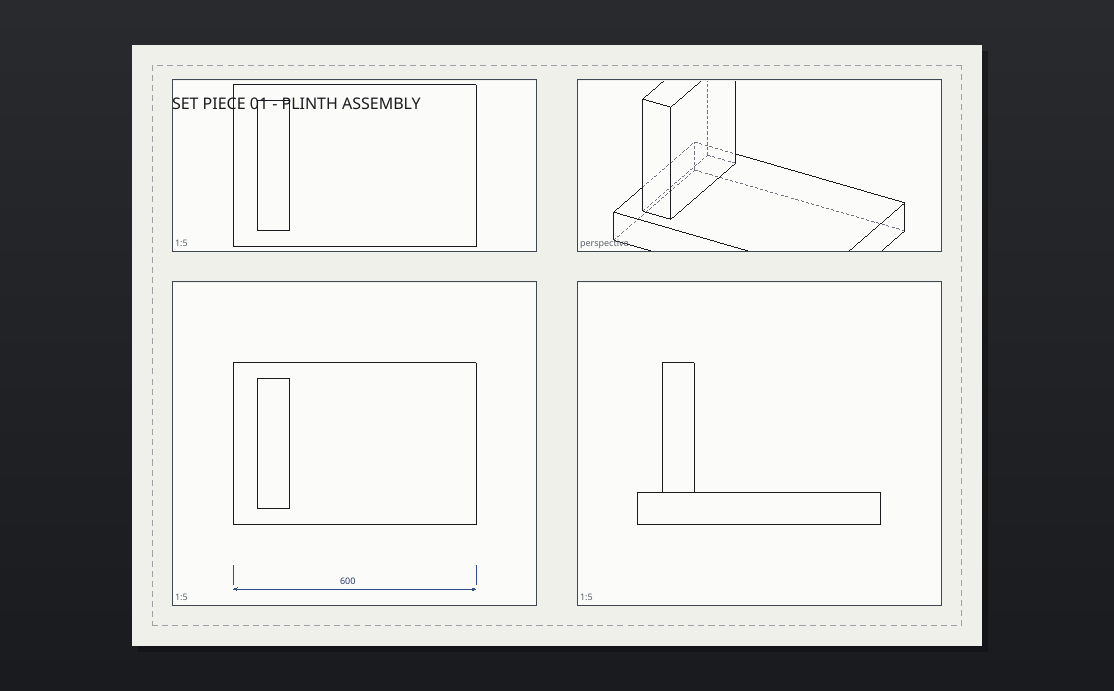
- Layouts — paper sheets, shown as tabs, in millimetres in a metric document and in inches in an inch or feet one. Each sheet holds detail views (windows into the model), plus annotations that live on the paper.
The tab strip along the bottom switches workspaces. Model holds the panes you model in; a sheet opens as the sheet, filling the viewport area. Each tab remembers the arrangement of panes you left it in, splitters included, and Properties, Layers and Display stay where you put them throughout.
A space belongs to each pane as well, so a pane's own title menu lists Model and every sheet in the drawing. Point one pane at a sheet and leave the others on the model when you want the drawing and the thing it draws side by side. Rhino makes you leave model space to look at a sheet.
Layouts
| Command | Does |
|---|---|
layout |
create/list/rename/delete sheets (A4–A0, Letter, Tabloid) |
detail |
drag a new detail view onto the sheet |
detailscale |
set the scale (accepts 1:50, 2:1, 1/4" = 1'-0", 1" = 20') |
detailmode |
wireframe / shaded / hidden / technical linework |
detaillock |
freeze a detail's camera |
detailsection |
live section cut with hatching |
Run detail and click two opposite corners on the sheet. The model appears
inside the frame while you choose the second corner. The first detail uses
Top, 1:100; later details reuse the last successfully placed view and scale
for the current window.
The View and Scale command options are available at either corner. Changing a setting returns you to placement without losing the first corner. The scale stays fixed as you resize the frame. Choose Fit to fit the model automatically as the rectangle changes; choose Scale to return to a fixed scale. Escape cancels placement. The finished detail stays selected so you can adjust its view and scale in Properties.
A scale is a ratio of real lengths, so 1:4 is a quarter of real size in any
units: an 18" part draws 114.3 mm (4 1/2") wide. In inch and feet documents
the scale list also offers architectural and engineering scales by name, such
as 1/4" = 1'-0" and 1" = 20'. Changing the document's units keeps every
detail at its scale.
Double-click a detail to enter it (pan/zoom acts on the model); click outside to leave. Selected details show corner grips for resizing; drag the body to move it.
Anything picked on a sheet also gets a gumball: an X arrow, a Y arrow and a pad that takes both at once. Drag a handle to move everything picked, or type a distance to move it exactly that far. Hold Alt while dragging an arrow or the pad to move a duplicate. Hold Shift while dragging the pad on selected text to scale it uniformly about its visible centre. Locked details stay where they are. Step into a detail and the gumball goes back to holding the model objects inside it. There, or in model space, Shift-drag a plane pad to scale equally along its two coloured axes while leaving the axis normal to the pad unchanged. Alt+Shift makes and scales a copy.
Annotations
text, leader, dim, dimradius,
dimdiameter, dimangle, hatch (corner picks or Mode=Region to
click inside linework), scalebar, titleblock, sheetindex,
revision.
Everything on a sheet is clickable: drag to move, Delete to remove,
annotedit to change text or hatch patterns. All of it is undoable.
Associative dimensions: a dim picked fully inside a detail
anchors to model space and re-projects when the detail pans or changes
scale. Hand-moving the dimension breaks the anchor on purpose.
Paper units: a dimension over a detail measures the model, in the
document's units. One drawn on bare paper measures the paper, in the units
the sheet is read in: millimetres in a metric document, inches in an inch or
feet document, as Rhino's templates set their layouts. Points and lengths
typed on bare paper are in those units too, so 2,1 on an inch sheet is two
inches across and one up, and 50mm or 1in still mean what they say. So
are text heights and arrow sizes, as CAD letters a drawing in its own units.
Print widths and hatch spacing stay in millimetres in any document.
Styles: dimstyle creates named text/arrow sizes shared by the
document (Standard, Small, Heading are built in). In a metric document
they letter at 3.2, 2.2 and 6 mm, and in an inch or feet one at 1/8", 0.09"
and 1/4". Lettering keeps its sizes when the document's units change.
Text and lettering
Use text for a layout note or textobject for lettering in the model.
Click the baseline position, then type multiple lines directly beside the text
in the drawing. Press Escape or click back in the drawing to finish.
Double-click existing text to edit it in place, or use the live Content
field in Properties. Font family and style, letter height and left, centre or
right alignment are available there without opening another window. Text edits
support Undo and Redo.
Letter height measures capital letters, as drafting standards do: model lettering uses the document's units, and layout notes use the units the sheet is read in, inches in an inch or feet document and millimetres in a metric one. The same goes for dimension and leader text, so 1/8" Standard text prints capitals 1/8" tall. A drawing saved before this release measured a dimension's, a leader's and a plain note's height as the font's size, which prints capitals about 0.71 of it, and it goes on printing as it did. Each line aligns to the picked baseline origin. Font metrics determine the spacing between lines.
Keep model lettering as Editable text to change its words and formatting later. Place it on the active CPlane, a selected planar face or a plane facing the current view. Look at text temporarily turns the camera square to an angled text plane while editing and restores the previous view afterward; it does not move the object. Placement survives moving, rotating, scaling, saving and Undo, and saved geometry preserves its appearance when reopening the file. Editable model text snaps cleanly at its baseline insertion point, four oriented corners, four edge midpoints and centre. These references follow the text plane when the object moves or rotates; converted curves expose their ordinary outline snaps instead. Layout notes expose the same references in paper space, with a high-contrast square marker at the insertion point and corners. The selection rectangle and snap bounds are identical and follow the actual font, alignment and named annotation style drawn on the sheet.
Choose Curves, Planar surfaces or Solid under Output in Properties
when you need ordinary modelling geometry, then press the Convert button that
appears beneath it. Curves and surfaces are grouped by default, so
selecting one contour selects the whole string; use ungroup to work with
individual pieces. Every output preserves the counters in letters such as B,
O and R. Solid output adds a positive depth along the text plane normal and is
capped. Conversion is one Undo step; geometry output no longer retains editable
words or font settings.
Native documents and PDF output retain the formatted notes. DXF note export still uses plain text and does not retain the new font, style or alignment settings.
Output
exportpdf— vector linework, raster shaded views, all sheets or one.exportsvg— per-sheet vector output.make2d— flatten the model's hidden-line drawing into model-space curves.